

How to migrate from Rebrandly to Dub
If you’re looking to migrate from Rebrandly to Dub, we’ve built a custom migration tool that will help you migrate your links in a few simple steps.Get your Rebrandly API key
First, log into your Rebrandly account and navigate to Account > API.If you don’t have an API key yet, click on “New API Key”, which will create a new API key for you.Copy the created API key. You’ll need it in the next step.
Use the Rebrandly migration tool
If you haven’t already, create a workspace on Dub.Then, from your workspace dashboard, click on the 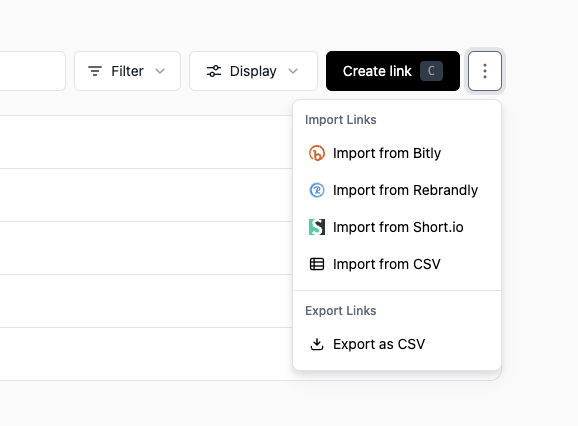 You’ll be prompted to enter your Rebrandly API key. Paste the API key you copied in the previous step and click Confirm API Key.
 Behind the scenes, we’ll fetch all your Rebrandly custom domains and their respective number of links. You’ll be presented with a list of domains that we’ve found.
Protip: Once you create your workspace, we generally recommend you not
to configure your domain until
you’ve migrated all your links. This will prevent any potential downtime for
your links.
⋮ button next to the Create Link button and select Import from Rebrandly.You’ll be prompted to enter your Rebrandly API key. Paste the API key you copied in the previous step and click Confirm API Key.Behind the scenes, we’ll fetch all your Rebrandly custom domains and their respective number of links. You’ll be presented with a list of domains that we’ve found.Select the domains you want to migrate
Select the domains you want to migrate. You can also choose if you’d like to import their respective tags as well. You can learn more about how tags work on Dub.One you’re done, click Confirm import. In just a few seconds, all your links and their respective tags will be migrated to Dub. Once all your links have been imported, we will send you an email to let you know that the migration is complete.
Once all your links have been imported, we will send you an email to let you know that the migration is complete.Configure your domain
Once you receive the email, you can configure your domain by setting the right DNS records. This will ensure that your links are pointing to Dub and not Rebrandly. Once you’ve done this, you can start using your links!
Which Rebrandly link attributes are migrated?
Here’s a list of attributes that are migrated from Rebrandly to Dub:- Destination URL
- Short link slug
- Link creation date
- Link updated date
- Link tags
- Link title (as part of Dub’s Custom Link Previews feature)
- Device targeting
- Geo targeting
- Deep links