

- Pricing: Companies must contact sales for a quote, with the average customer paying $18,000 annually, plus a ‘take fee’ on affiliate payouts that can be as high as 15%. These costly annual contracts lock you in before your affiliate program has a chance to scale.
- Complex UI: PartnerStack has every feature you can think of, resulting in dense navigation, buried settings, and workflows that require documentation to understand.
- Affiliate network: PartnerStack has one of the largest affiliate networks with 65,000+ users. But customer feedback consistently shows that most of these ‘partners’ generate no results. You have to manually go through thousands of profiles to find the few who actually drive revenue.
- Pricing that scales with your success: You can start your affiliate program on Dub with as little as $90/month and only 5% payout fees. As you grow, payout fees drop to 3%, giving you the flexibility to reward partners without high costs eating into your margins.
- Modern UI with enterprise-grade capabilities: Dub’s modern interface makes it simple for both you and your partners to navigate without a learning curve. You can use our Embedded Referral Dashboard to create a seamless referral experience, or leverage our best-in-class Fraud Detection suite to ensure the safety/compliance of your program. The possibilities are endless.
- Powerful affiliate network: With over 5,000 meticulously vetted affiliates in our partner network, Dub makes it easy to find and recruit high-performing partners with a proven track record of driving results.
How to migrate from PartnerStack to Dub?
If you’re looking to migrate from PartnerStack to Dub Partners, we’ve built a custom migration tool that will help you migrate everything over in just 2-3 clicks – without breaking any existing PartnerStack affiliate links.Add a custom domain to your Dub workspace
Before starting the migration process, you’ll need to add a custom domain to Dub. This domain will be used to create short links for each affiliate link that we import from PartnerStack.If you haven’t added a custom domain to Dub yet, you can follow this guide to set that up.
Set up conversion tracking
Next, set up conversion tracking to track signup and sale events. We also have some in-app guides that you can reference here.
Get your PartnerStack API Keys
Follow this guide to get your PartnerStack API keys – API keys can be created in the Settings → API tab of your PartnerStack dashboard: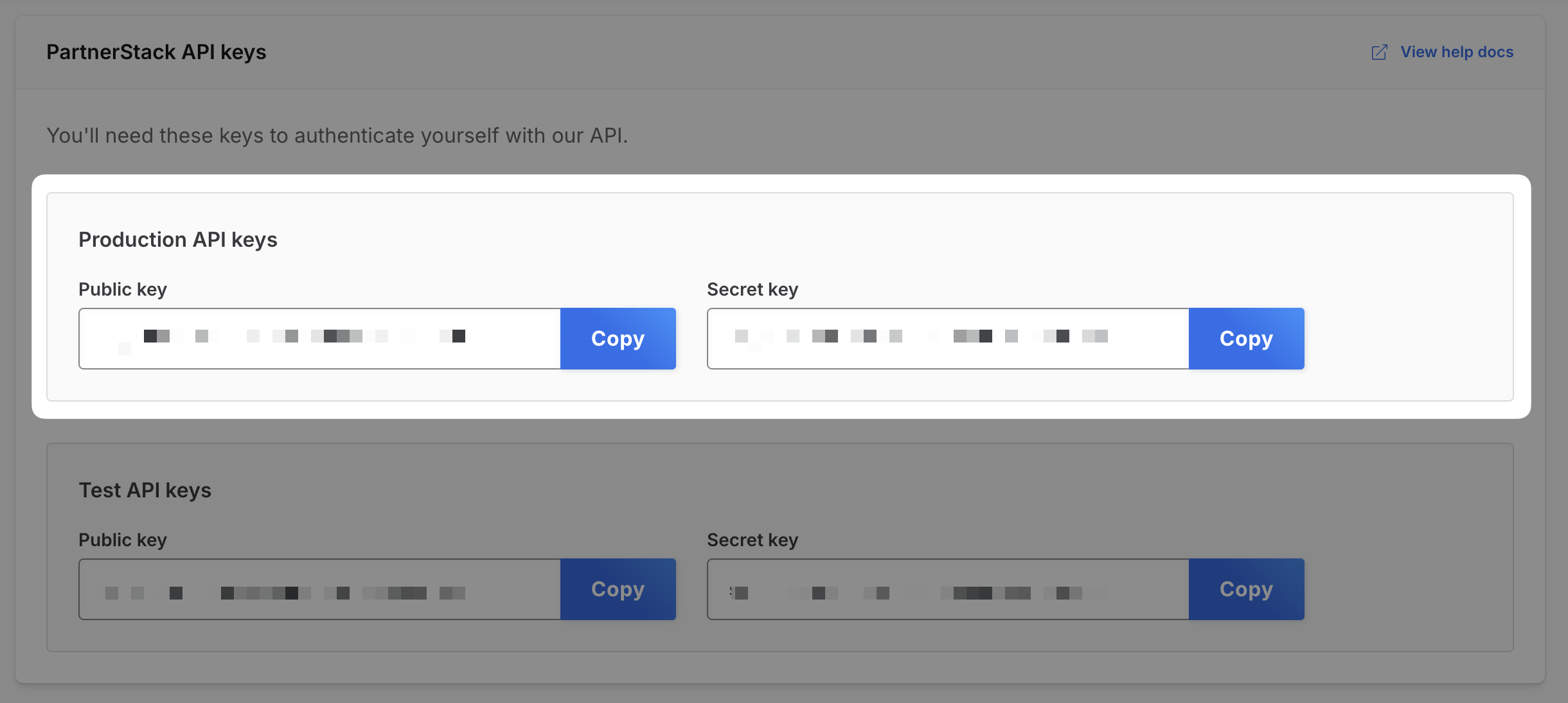 We will use the generated Public and Secret keys to retrieve and import your existing PartnerStack program to Dub.
We will use the generated Public and Secret keys to retrieve and import your existing PartnerStack program to Dub.Import your PartnerStack program in the Partners tab
Once you’ve set up your Dub partner program, go to your Partners tab, click on the 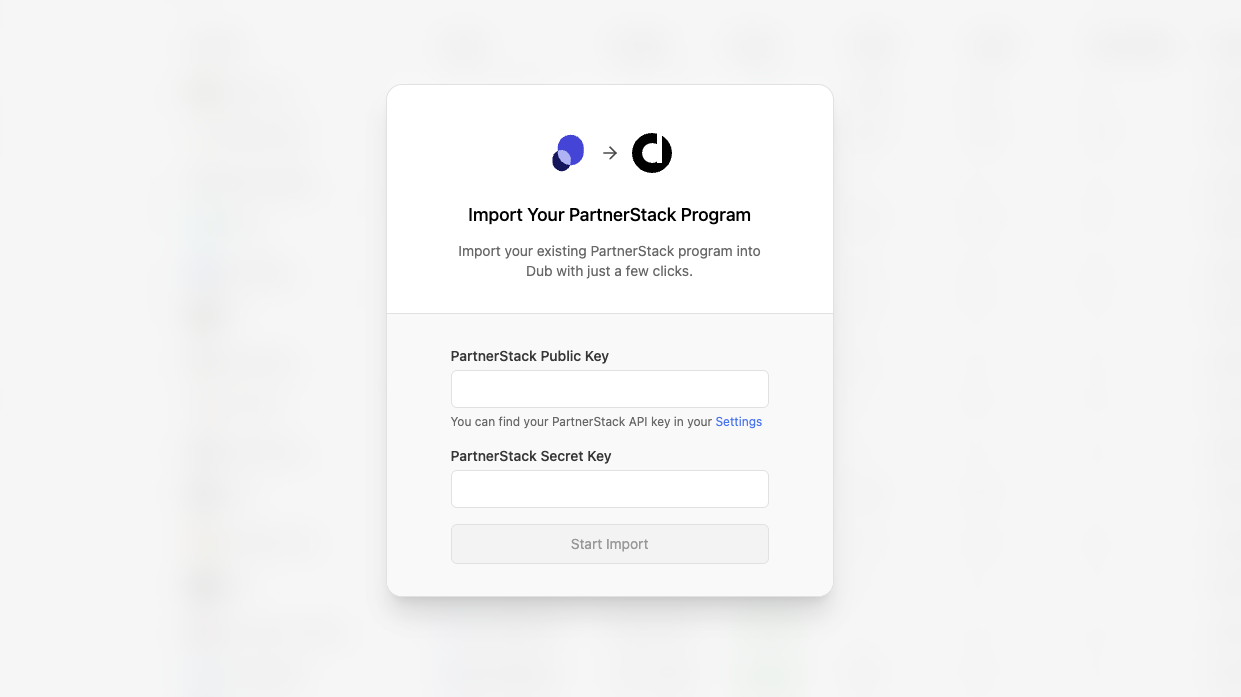 Then, add your PartnerStack Public and Secret keys and select Continue.
⋮ button and select “Import from PartnerStack”.To save you some time, here’s a quicklink that will get you directly to the PartnerStack import flow.Then, add your PartnerStack Public and Secret keys and select Continue.What data is migrated?
Our PartnerStack migration tool imports the following attributes to Dub Partners:Affiliates / Partners
To ensure the efficiency of your partner program, we automatically filter out dormant affiliates and only import the ones that are both:- In an “active” state (docs)
- Have at least 1 lead / referral
Since PartnerStack doesn’t expose a
/triggers endpoint, your PartnerStack triggers will not be migrated – all partners will be assigned to your program’s default reward.Learn more about how Partner rewards work on Dub.Feel free to reach out to support if you need help manually configuring specific reward groups for your importer partners.Referrals / Customers
By default, we import all referrals that are associated with an affiliate in your PartnerStack campaign. This ensures that all subsequent subscription renewal events will continue to be tracked on Dub. Certain customers will not be imported, such as test accounts or any customer that is not associated with an affiliate link.Commissions
We also import all commissions associated with any customers that were imported above. Depending on the commission state on PartnerStack, they will be marked accordingly on Dub as well:| PartnerStack | Dub |
|---|---|
Pending | Pending |
Approved | Processed |
Paid | Paid |
Declined | Canceled |
Hold | Fraud |
Refunded: When the sale for the commission was refunded. With our Stripe integration, this is automatically detected and updated.Duplicate: Useful for marketing if a commission was rewarded more than once and needs to be marked as a duplicate event.
Next steps
After importing your campaign, here are some recommended next steps:1. Set up your bank account for partner payouts
Dub Partners supports 1-click payouts to partners all across the globe.
We generally recommend using ACH for partner payouts as it is the most cost-effective option. Here’s how you can set up your bank account for ACH payouts.

2. Notify your affiliates about the platform change
Next, you’d want to reach out to your existing partners and let them know about the platform change. To do that, you can send them an email with the following example verbiage:Hey, Starting today, we are switching the [Your Company] Affiliate Program from PartnerStack to Dub Partners. To get started, follow these steps:Let us know if you have any questions!
- Sign up for a Dub Partners account here:
partners.dub.co/{your_program_slug}/register- Connect a payout method to receive your commissions.
- Start sharing your shiny new referral link with your audience 🚀